
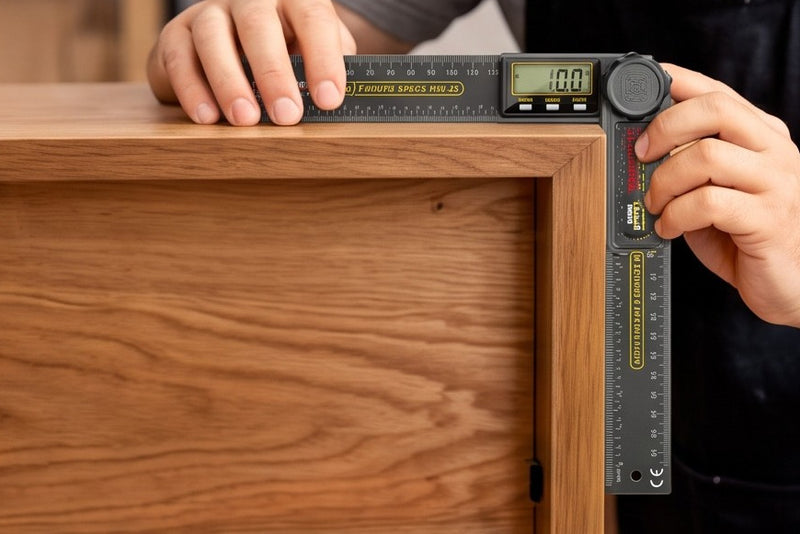
Carpentry and furniture
Lay the blades into a corner that is nearly but not quite square, read the number, lock the knob and carry it to the miter saw. The rule on the blades handles the short measurements in the same hand.


0–360° · 200 mm rule · 62 g
A protractor and a rule on the same hinge. Open the two blades against whatever you are working on, read the angle off the screen to a tenth of a degree, and use the millimeter and inch scales on the blades without reaching for a second tool. Read this first: it measures the angle between its own two blades. It is not a level, so it cannot tell you how far a surface leans away from horizontal.
A 2-pack or 3-pack is that many complete rulers, each with its own charging cable. The maker does not build a twin pack, so they are picked and shipped as singles and may arrive on different days.

Turn it over
Drag to turn the model while the blades swing all the way round — the hinge takes them through a full circle, and the figure on the screen follows. The display and the three buttons sit on the head, the knurled knob locks the blades, and both blades carry a scale.
This is a 3D model we built in code from the maker's own photographs, to the dimensions it publishes. It is not a photograph of the item, and the angle it shows is our illustration, not a measurement. The photographs in the gallery above are the maker's own.
Two tools on one hinge
Open the blades onto the work, read the number, lock the knob and carry the angle to the saw. Zero to 360 degrees, shown to a tenth of a degree, with a 200 mm rule in millimeters and inches printed down both blades.


The whole interface
There is nothing to learn here. Three buttons sit under the screen — ZERO, HOLD and ON/OFF — and a knurled knob on the hinge locks the blades where you left them. That is the entire control set, and the maker's own charging graphic is the only place it prints the labels legibly, so those are the three names this page uses.
Close the blades on a reference surface and press ZERO. From then on the screen counts from there, so you can read how far a second surface differs from the first rather than doing the subtraction in your head.
Press HOLD and the number stays on screen while you take the tool off the work and walk to the saw. The maker also has it switch itself off after six minutes with no input, so it is not quietly draining in the bottom of a bag.
Tighten the knob and the blades stop moving, so the angle you measured is the angle that reaches the workpiece. Loosen it and they swing freely again. There is no battery door to fight with: the cell is built in and a charging cable is in the box.
The maker's other photos show the same three buttons with the lettering rendered unreadably. We have gone with the one graphic where it can be read.
The specifics
Everything below is the maker's own figure unless it says otherwise. The accuracy line is the one worth reading twice, because it is written as a formula rather than a single number, and what it works out to depends on the angle you are measuring.
angle range
One full circle. The display also carries a running total up to 999.9°, which is a counter, not an angle you can measure in one go.
resolution
The smallest step the screen will show. Resolution is not accuracy — see the next tile.
stated accuracy
The maker's formula. Worked out: about ±0.9° at 45°, ±1.4° at 90°, ±1.85° at 135°.
rule on the blades
About 0 to 7⅞ in. Millimeter and inch scales are printed down the blades.
weight
About 2.2 oz, the maker's figure for the whole tool.
to auto power-off
It switches itself off after six minutes with no button pressed.
* Marked figures are the maker's own and are not measured by us. No test report is published for this tool.

A folding digital protractor with a 200 mm rule on the blades, a built-in rechargeable cell, and a locking hinge. It reads the angle between its own two blades; it has no gravity sensor and is not a level.
The maker's own accessory graphic names these four things. No case, no pouch and no spare blade.
Where it earns its keep
Four kinds of work the maker shows it doing. All of them have the same shape: there is an angle already in front of you, and you need the number so you can cut, set or check something to match it.
Lay the blades into a corner that is nearly but not quite square, read the number, lock the knob and carry it to the miter saw. The rule on the blades handles the short measurements in the same hand.

Checking an aluminum extrusion or a welded bracket against the angle it is meant to be. Press ZERO on the first face and the screen then tells you how far the second one differs, instead of two readings and a subtraction.

Taking the angle of a suspension arm or a bracket before you take it off, so you have a number to put it back to. HOLD keeps the reading while you get your head out from under the wheel arch.

Transferring an angle off a plan and onto a board, or back the other way. The flat bottom edge sits down on the paper, and both blades carry a scale, so one tool sets the angle and the length.
Living with it
A 3.7 V, 90 mAh cell is built in and a charging cable comes with it. The indicator glows red while it charges and goes out when it is full. The maker publishes no charge time and no runtime, so the honest advice is to top it up when you think of it rather than plan a day around a figure nobody has given us.
Sit the flat bottom edge against one face and swing the second blade onto the other. The screen follows as you go, down to a tenth of a degree, so you can creep up on a number instead of reading it once and hoping.
Tighten the knurled knob and the blades stop where they are. Press HOLD if you want the number frozen on screen too. Now the tool itself is the template: lay it on the stock and mark along a blade.
That is the whole routine. The one thing worth remembering is what the number means: it is the angle between the two blades, not the slope of the surface they are sitting on. If what you need is how far something leans away from level, that is a different tool.
Compared with the usual options
Three ways to get an angle onto a workpiece. They are not interchangeable, and the row that catches most people out is the last one.
| Feature | Nexura digital angle ruler | A plastic protractor and a rule | A magnetic digital angle finder |
|---|---|---|---|
| Reads the angle as a number | ✓ to 0.1° | You read it off a printed scale | ✓ to 0.1° on most |
| Measures between two surfaces | Only one surface at a time | ||
| Tells you how far a surface leans from horizontal | ✓ — that is its job | ||
| Doubles as a 200 mm rule | ✓ mm and inches | ||
| Locks the angle to carry it | ✓ knurled knob | Depends on the model | ✗ nothing to lock |
| Sets its own zero | ✓ one press | ||
| Needs charging | Built-in cell, cable in the box | Never | Usually batteries |
| Readable in a dark corner | No backlight is claimed | Depends on the model | |
| What it costs you when it is wrong | ±1% + 0.5°, the maker's formula | However well you can read a scale | Depends on the model |
Compared by type, not by brand. Nothing in this table is an accuracy rating; no test report is published for this tool.
Free shipping on orders of $49 or more. Below that, standard shipping is a flat $4.95 to any of the 50 US states. Delivery takes 7–15 business days from the time you order, and that window already includes the 1–2 business days we take to process. Shipping & Delivery.
30-day returns. Items must be unused and in their original packaging. Email support@nexuratool.com with your order number to start a return. Returns & Refunds.
30 days from delivery. Email support@nexuratool.com with your order number and what you want to return. We reply with a return address — do not send anything back before you have it, or we cannot match the parcel to your order.
What we can take back: unused items in their original, undamaged packaging. Adhesives, sealants and lubricants cannot be returned once opened; the same goes for any item with a broken safety seal. That is a safety and hazardous-goods rule, not a preference.
Who pays: return shipping is paid by you, except when the item arrived damaged, faulty or was not what you ordered — then we cover it and refund the original shipping too.
Refunds go back to the original payment method within 5 business days of the return reaching us. Full returns policy.
QUESTIONS PEOPLE ASK
0–360° · 0.1° steps · 62 g
One ruler, two or three, each with its own charging cable. It reads the angle between its own blades to a tenth of a degree — it is not a level. Free US shipping from $49, and 30 days to return unused items.
